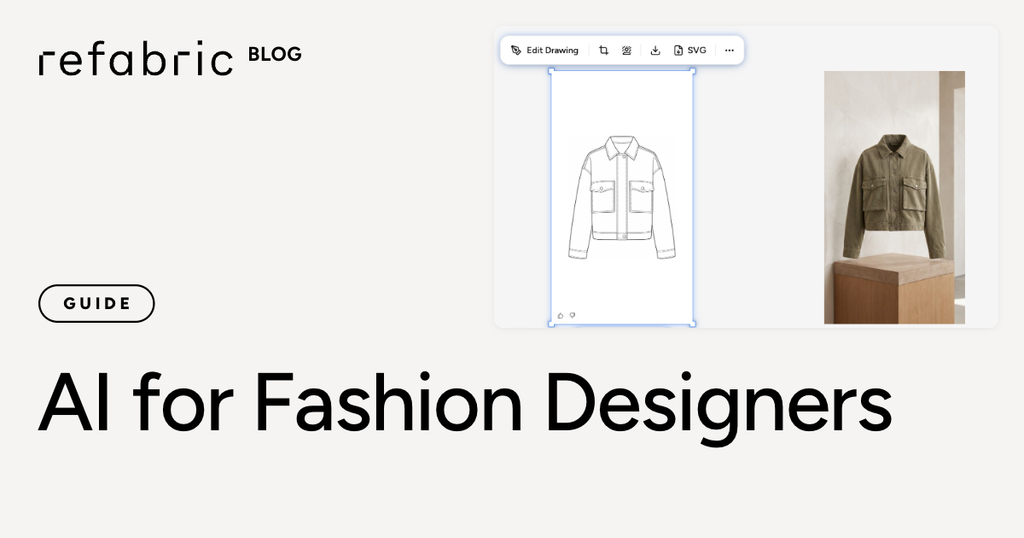
AI for Fashion Designers: Tools, Workflow and Where It Helps
In this article
What AI for fashion designers actually means
Most designers meet AI through a general image generator: type a sentence, get a pretty picture, and then wonder what to do with it. That picture is rarely a design. It has no flat, no construction logic, no link to your brand, and nothing a factory can read.
AI for fashion designers is something narrower and more useful. It is a set of tools that sit inside the work you already do — research, concepting, iteration, technical handoff and product imagery — and take the slow, repetitive parts off your desk. The creative calls stay with you. What changes is how many options you can see before you commit, and how quickly a direction becomes a document someone else can act on.
This guide walks through a typical collection workflow stage by stage: what AI does well at each step, where it still needs your eye, and how to start without wasting a season on experiments.
Where AI fits in the design workflow
Think of a collection as a chain: direction, concepts, variations, technical files, imagery. AI helps at every link, but in different ways.
Research and trend direction
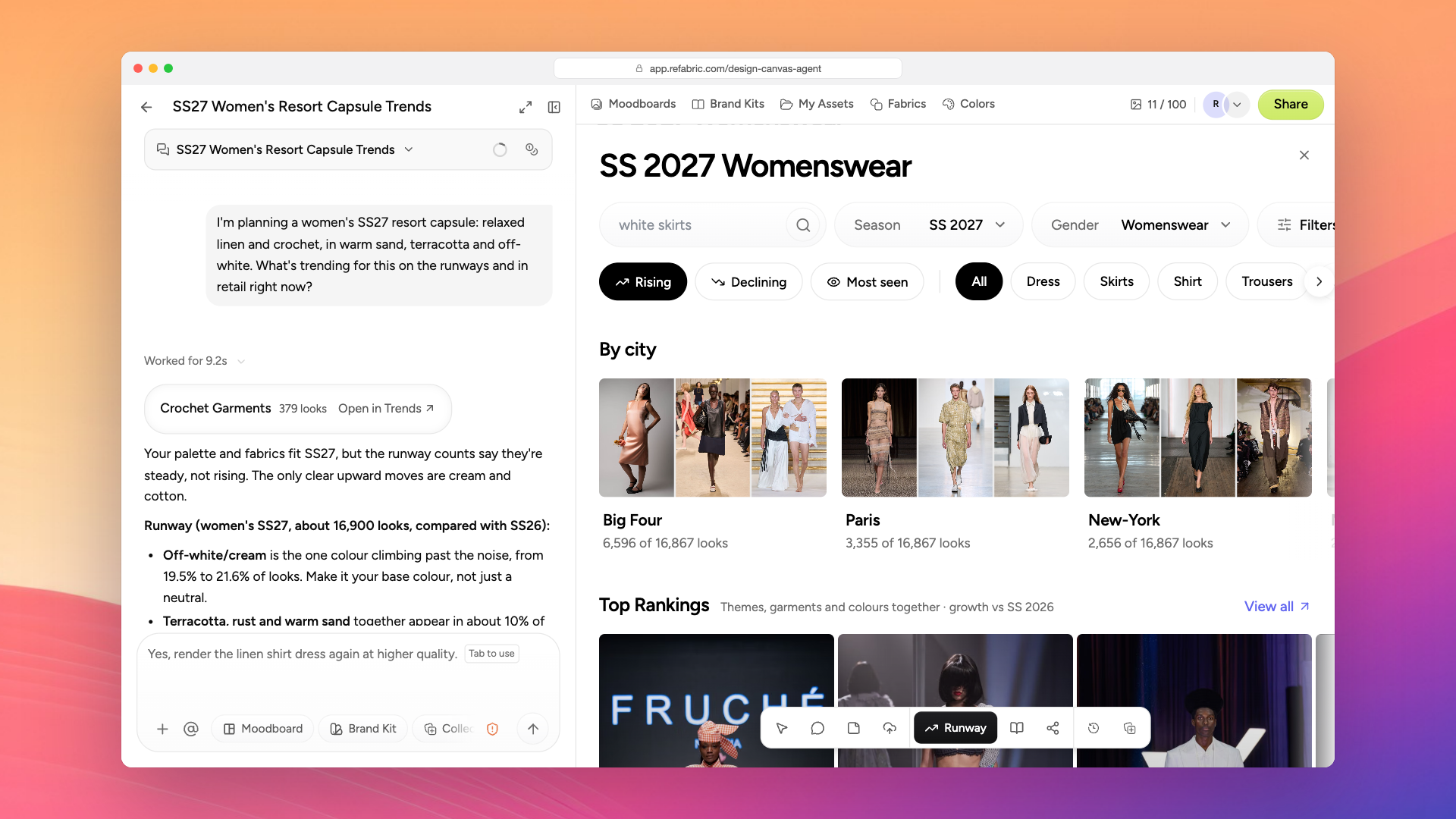
Trend research used to mean weeks of runway reviews, street photos and reports. AI-powered trend tools pull runway and social data together and break it down by attribute — silhouette, color, fabric, detail — so you can see what is rising in your category instead of scrolling through thousands of looks.
The useful output here is not a "trend forecast" to copy. It is evidence for a decision you were already weighing: is a softer shoulder gaining ground in your market, or is it one designer's signature? Use the data to narrow, then let your point of view decide.
Concepts from a prompt, a reference or a sketch
The fastest way to get value from AI is to start from what you already have. Good design tools accept three kinds of input:
- A text prompt — a description of the garment, its fabric, its mood and its customer. Specific beats poetic. If you want help, our guide on how to write fashion design prompts covers the structure.
- A reference image — a mood image, a vintage piece or an archive bestseller you want to build from.
- A sketch — your own line drawing, turned into a realistic render so you can judge proportion and fabric before anyone cuts a sample.
Sketch-to-render is often where designers are won over. Your hand stays in the work; the tool just shows you what the sketch looks like as a garment.
Iterating on color, fabric, print and trims
Once a base design exists, AI is at its best making variations. Instead of redrawing a jacket to test a new pocket, a different collar or three colorways, you describe the change in plain language and compare the results side by side.
This is where volume helps. Seeing a dozen versions of a trim detail in one sitting makes the right one obvious faster than imagining them. Keep the brief tight, though: change one thing at a time so you know what made the difference.
Color accuracy matters at this stage. Work with exact Pantone or HEX codes rather than color names, so what you approve is what reaches the color sheet.
From design to flat drawing and tech pack
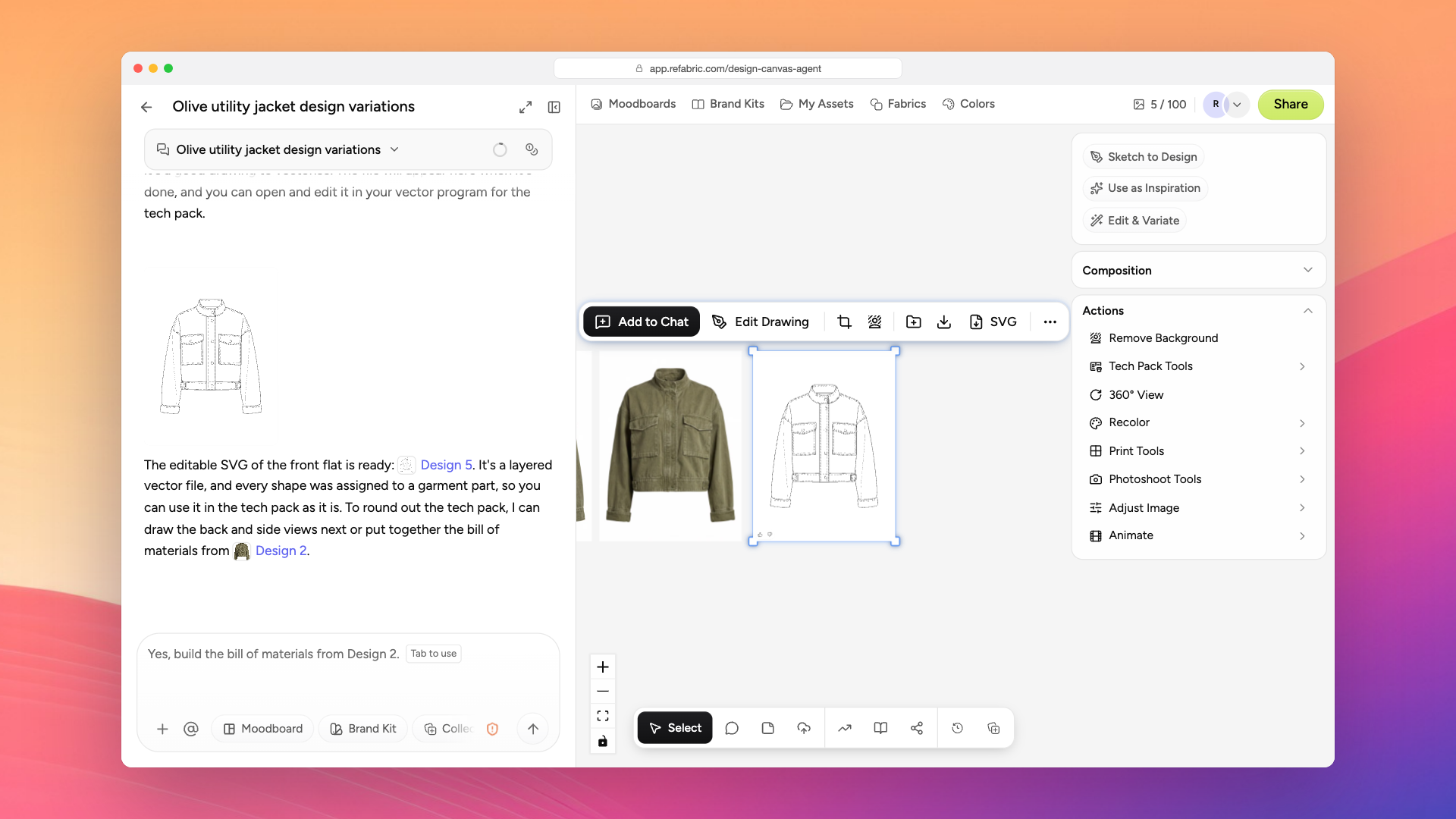
A render is a picture. Production needs a technical flat, a bill of materials, measurements and construction notes. This handoff has traditionally eaten days of a designer's or product developer's week.
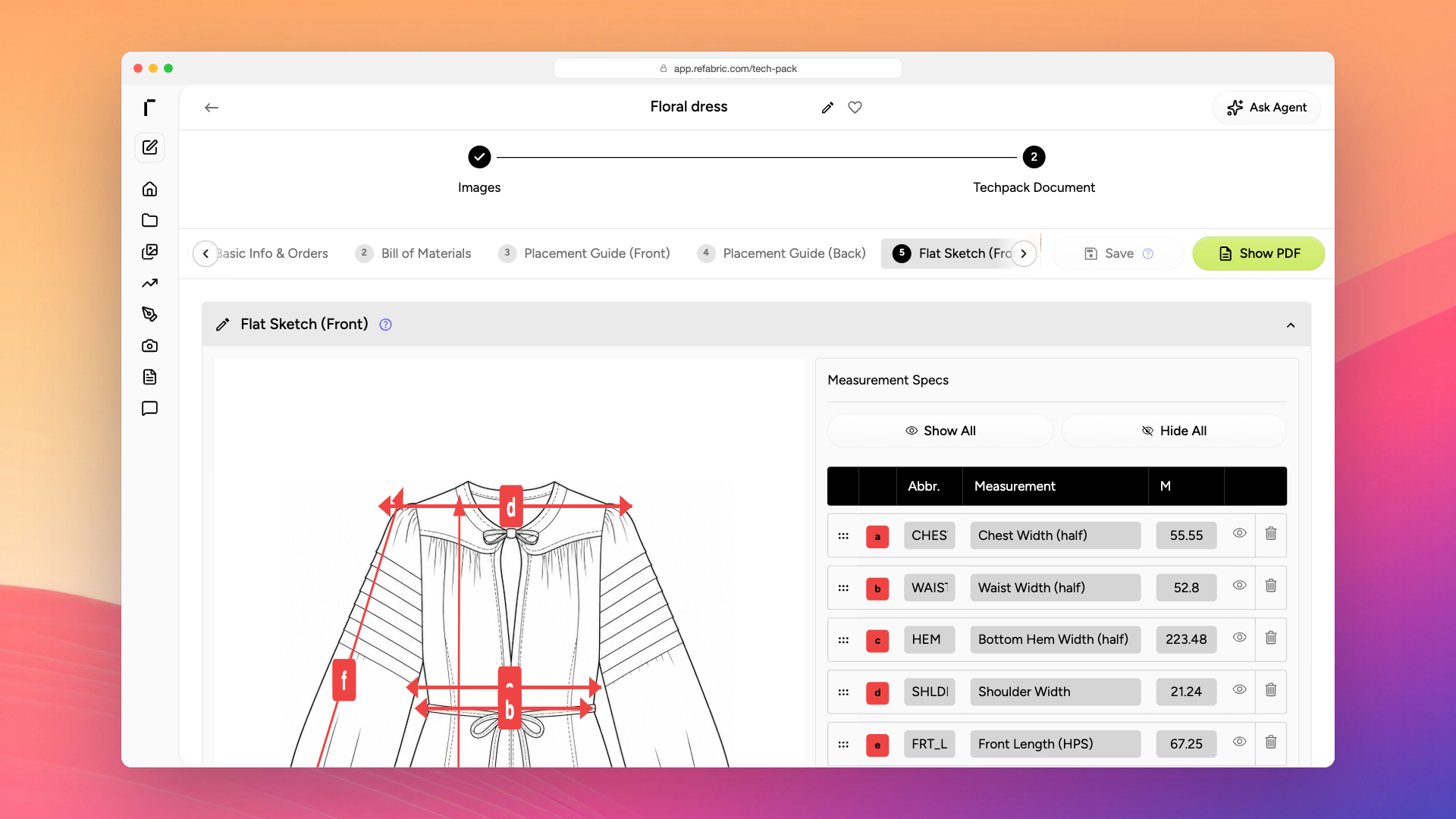
AI can now convert a finished design into a clean technical flat drawing and, from front and back product images, draft the structured sections of a tech pack. You still check every measurement and callout — a factory builds exactly what the document says — but you start from a filled draft instead of a blank template.
Imagery before samples exist
Buyers, merchandisers and e-commerce teams want to see the product on a body long before production photos exist. AI photoshoot tools generate on-model images from a product photo, along with flat lay and ghost mannequin shots. For designers, that means line reviews and pre-sell decks that look like the final product rather than a mood board.
How to start using AI in your design process
You don't need to rebuild your workflow. Start small and measure what changes.
- Pick one bottleneck. Variations, flats and tech pack drafts are the usual candidates because the output is easy to judge.
- Feed it your own material. Archive bestsellers, past collections and your sketches produce work that looks like your brand. Generic prompts produce generic garments.
- Run one style end to end. Take a single piece from concept to flat to tech pack draft. You'll learn more from one complete pass than from a hundred disconnected images.
- Set review points. Decide where a human signs off — usually after concept selection and before anything goes to a supplier.
- Share the workspace. Iteration gets faster when the merchandiser and product developer comment on the same canvas instead of a chain of emails.
- Keep what works, drop what doesn't. After one season, you'll know which steps AI genuinely shortens for your team.
Common mistakes designers make with AI
- Treating the first output as the design. The first result is a starting point. The design is what you edit it into.
- Prompting without a customer. "A beautiful dress" gives you an average dress. Name the occasion, fabric, fit and price positioning.
- Ignoring brand consistency. Without your archive as a reference, a collection drifts into whatever the model has seen most.
- Skipping the technical check. An AI-drafted tech pack still needs a designer's review of measurements, tolerances and construction before it reaches a factory.
- Not reading the terms. Know who owns what you generate and whether prints are royalty-free. The U.S. Copyright Office's guidance on AI is a good starting point on how the law treats AI-assisted work.
What stays the designer's job
AI is fast at producing options and slow at knowing which one matters. Choosing the story of a collection, editing a range so it hangs together, knowing your customer's body and budget, judging hand-feel and drape, negotiating with a factory — none of that moves to a tool.
If anything, AI makes taste more visible. When everyone can produce a hundred variations, the value is in the designer who knows which three to keep. We explored this balance in more depth in fashion AI and human designers.
How Refabric supports fashion designers
Refabric was built around the workflow above rather than around a single image generator. Its AI design features cover each stage:
- Design Canvas brings real-time trends and your own brand archives into one drag-and-drop workspace. You start from a text prompt, a reference image or a sketch, iterate on several designs at once, and share the canvas so teammates can work on it with you in real time.
- Trend Analysis draws on data continuously ingested from major runway shows and social media platforms, with attribute-level insights and trend-aligned design suggestions.
- Train Brand Identity analyzes your past collections, bestsellers and moodboards — fabrics, color palettes, silhouettes, trims and construction details — and builds a Brand DNA profile you can apply to a new design with a single click.
- Sketch to Render turns your sketch into a realistic render, and Design Variations lets you change fabric, color, print, trims and silhouette, or add details like zips, collars and logos, through natural-language prompts.
- Prints & Patterns creates and scales custom prints on a garment while keeping the fabric texture, with no royalties. SVG Export keeps print layers editable in professional design software, and the Color Library works with Pantone and HEX codes.
- Design to Flat Drawing converts a design into a clean technical flat. From there, AI tech packs take front and back product images and return a structured document with a bill of materials, measurement chart, construction callouts, color sheet, cost sheet and care instructions.
- AI Photoshoot generates on-model visuals from a single product photo, plus flat lay and ghost mannequin images.
All designs you create with Refabric remain entirely your property.
FAQ
Will AI replace fashion designers?
No. AI generates options quickly, but it doesn't decide what a collection should say, who it is for or which pieces belong together. Those editorial and commercial judgments are the core of the job. What AI replaces is repetitive work — redrawing variations, drafting flats and filling templates — which leaves designers more time for the decisions that matter.
How do fashion designers use AI day to day?
Most use it for trend research, turning sketches or prompts into renders, testing colorways and trims, and converting finished designs into flats and tech pack drafts. Some also generate on-model imagery for line reviews before samples exist. The common thread is speed on repetitive steps, with the designer reviewing and editing every output.
Who owns designs made with AI tools?
It depends on the tool's terms and on local law. Read the platform's terms to see whether you keep ownership of what you generate, and whether prints are royalty-free. For how copyright treats AI-assisted work, the U.S. Copyright Office publishes guidance. Documenting your own creative input, like sketches and edits, also helps.

The Refabric team writes about how fashion brands design, develop and produce collections — tech packs, sampling, product photography — and where AI helps. Every article is reviewed by the team before it is published.
Design it, cost it and shoot it in one place.
Start free, or book a demo and we'll walk you through it.
More in Fashion AI
View all →
Refabric Is SOC 2 Certified: What Enterprise-Grade Security Means for Fashion Teams
By Refabric Fashion Design AssistantOctober 6, 20263 min read
Creative vs Algorithm: How Fashion AI Is Transforming the Role of Designers and Marketers
By AI Fashion Design AssistantApril 1, 20264 min read
From Trend Forecast to Digital Fabric: How Fashion AI Is Powerfully Revolutionizing the Design Timeline
By AI Fashion Design AssistantFebruary 25, 20264 min read